Showing posts with label USPTO. Show all posts

Friday, May 12, 2023

The End of Paper Plant Patents

Apparently, we have received the last of the paper copies of plant patents.* While a part of me is sad--looking through pictures of new plants was always entertaining--I understand the reasons for it. Paper copy distribution is expensive, uses resources, and the copies take up space in depository libraries/PTRCs.

Loyal readers and fellow plant patent fans are likely asking, "But how will we see the important color images of patented plants?" After all, the images included in Patent Public Search and therefore all other patent search tools and databases are grayscale and low quality.

Fortunately, you can still find color images of plant patents using Patent Center.

Unfortunately, you have to know the number of the plant patent you want to see in advance, and it only goes as far back as about 2007. I've also found this works with some Internet browsers (Chrome) and not others (Firefox).

Here's a brief tutorial plus images for finding the color images we all crave.

  1. Search for a patented plant in Patent Public Search (please see other entries or resources for help with that) or another tool of your choice.
  2. Once you find the patented plant desired, post 2007ish, make a note of the patent number.
    Search results list and search query panels in Patent Public Search, showing Hibiscus plant patents
  3. On the home page of the USPTO, hover your mouse cursor over the Find It Fast menu and then select Patent Center (first listing).
    Find It Fast menu on USPTO.gov with a red arrow pointing to the first Patent Center link
  4. OPTIONAL: Log into Patent Center with your USPTO account. This is not necessary, but if you have one, why not? 
  5. On the home page, select Patents # from the drop down menu next to the search bar.
    Patent Center search box with drop down menu to select what type of number to search
  6. Enter the patented plant number, complete with PP prefix, and click the search button (magnifying glass icon) or use the Enter key.
    Patent Center search for plant patent number PP20121
  7. The patented plant's page will open to its Application Data. Using the menu on the left side, select Supplemental Content.
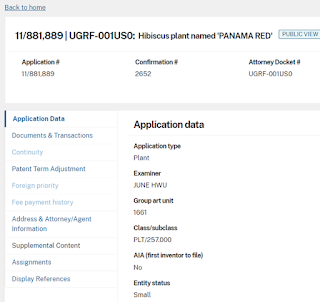
    Patent Center information for plant patent PP20121
  8. On that page there will be an option to download JPEGs and PDFs or just preview a PDF.
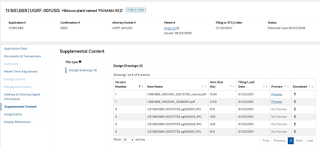
    A listing of the supplemental documents that includes plant patent images
  9. Voila! You have found color images of plant patents, and all future patented plants should be findable here, too.

So, while it isn't as fun as having stacks of new plants to look through, and the quality of a scanned photo is never as good as an original print, at least we have something.


*I say "apparently" because immediately following the official announcement that April 18th would be the last issue date, more paper copies were issued. Clarification should be forthcoming...

Wednesday, March 8, 2023

Rice's European Patents

Let's talk about the patents that Rice University owns that were granted in Europe. Little attention has been paid to these in the past, to the point that one might be surprised to learn Rice owns patents in Europe.

At present, there are 5 active patents assigned to Rice by the European Patent Office (EPO), according to Lens.org.

Among them, the most recently granted was EP 3,033,346 B1, Derivatives of Uncialamycin, Methods of Synthesis and Their Use as Antitumor Agents. Granted January 8, 2020, it was invented by a team of 6 inventors (Kyriacos C. Nicolaou, Min Lu, Debashis Mandal, Sanjeev Gangwar, Naidu S. Chowdari, and Yam B. Poudel) and co-owned by Bristol-Myers Squibb Co. and The Scripps Research Institute. The same patent is also filed with the USPTO, under the same title, and the applications were submitted on the same day. However, there were three patents granted by the USPTO stemming from the first application set: US 9,777,013; US 10,233,192; and US 10,889,590. 

EP 3,033,346: Derivatives of Uncialamycin, Methods of Synthesis and their Use as Antitumor Agents

There is nothing obvious about these five inventions indicating why Rice pursued their ownership in the EU. Only one, EP 2,753,733 B1, Carbon Nanotubes Fiber Having Low Resistivity, High Modulus and/or High Thermal Conductivity and a Method of Preparing Such Fibers by Spinning Using a Fiber Spin-Dope, is co-owner or co-invented by an entity or people located in Europe. In that case, half the invention team and Conyar B.V. are from the Netherlands. 

Carbon Nanotubes Fiber Having Low Resistivity, High Modulus and/or High Thermal Conductivity and a Method of Preparing Such Fibers by Spinning Using a Fiber Spin-Dope
EP 2,753,733: Carbon Nanotubes Fiber Having Low Resistivity, High Modulus and/or High Thermal Conductivity and a Method of Preparing Such Fibers by Spinning Using a Fiber Spin-Dope

The other four are either co-owned by American entities or Rice entirely. Perhaps there are commercial interests abroad that aren't obvious in a patent.

Expanding results to include expired patents doesn't really increase our results; evidently there are only two more EPO Rice patents. None of them were filed before 1998, and that one expired patent is an outlier by about 4-5 years. A few more results pop up if applications are included, but again the increase is minimal.

EXPIRED! Hemoglobin Mutants with Reduced Nitric Oxide Scavenging

With so few EPO patents, past, present, and potential, we simply must conclude Rice doesn't have much interest in owner European IP.  

Wednesday, January 4, 2023

Basic Search Now Available

 Better late than never, some might point out: a new basic search mode for Patent Public Search, or PPUBS, was released mid-December. It wasn't given much publicity or announced before it was released, which led to a bit of confusion during a consultation here at the Kelley Center (the email announcement arrived a day or two later). 

At first glance, it appears fairly intuitive, if more similar to an advanced search one might see in a library catalog (like Fondren's) or a database/platform (like JSTOR). 

An image of the new PPUBS basic search mode
The new Patent Public Search Basic

Below the quick lookup for patent publication numbers, each search box has a drop-down menu with a fairly short list of common fields that don't require formatting like a suffix. Between the two search entry boxes is the drop-down menu of Boolean operators AND, OR, NOT. XOR and proximity operators have been excluded, which is understandable for a basic mode.

The brief set of query building instruction next to the search is about as long as possible for a basic mode, but it lacks explanation (or a link to one) of how Boolean operators work, which many people need.

Screenshot of the basic guidelines for query building in PPUBS
A few guidelines for building search queries
It is a strong start on a new design for a more basic, user-friendly search, but lacks a few key features that may alienate users:

  1. Only two search entry fields are available. Users cannot add more. This restricts searching, and will probably lead to lengthy, overwhelming results lists (high recall, low precision).
  2. There is no clear way to download, save, or print a list of search results. I am frequently asked if it is possible to download results lists in Excel-friendly formats. Many people want to use Excel to refine or organize results, rather than changing search queries. This tool's limitation to two search term boxes may make organizing or refining results in another program necessary. Furthermore, keeping track of searches and results is extremely important in any patent search, basic or advanced. 
    Screenshot of results list from PPUBS Basic Search
    Over 27,000 results is a lot to review without tools to organize or refine
  3. There are no refining options once results are returned. Usually, this is not problematic in a simple search mode, but here it is. Without some basic limitation options at the start--specifically to search within the databases of patent application or granted patents post-1970--it means novice searchers could be confused about what results are for patents versus patent applications. I particularly dislike the inability to change how the list is ordered. Post-search refinements like these are usually the same in both simple/basic and advanced search modes.

Screenshot of a results list from Fondren's OneSearch simple mode, and the refinement options
Fondren's OneSearch provides results refinement, left side, in both simple and advanced modes
These are three primary problems that immediately stand out.
 
My verdict: I would not recommend using the new basic search for discovery or research. It seems most useful for finding patents the user already knows, and then with document number, inventor, assignee, or other specific information from the searchable fields. It is a poorly constructed tool for comprehensive searching.

The USPTO released this version in response to requests. While I understand that Patent Public Search, released last February, may initially have been overwhelming, it isn't any worse than previous advanced patent search tools from the USPTO. Presently, the new basic mode's primary advantage is its appearance--one markedly similar to other search tools. 

Maybe Fondren User Experience could provide a few pointers? Let's hope some improvements are made down the line.


Thursday, November 10, 2022

Pocky Day IP

Happy Pocky Day! 

Yes, evidently Nov. 11th is not only Armistice Day or Veteran's Day, it is also Pocky Day®. (If you want to learn about patents related to Armistice or Veteran's Day, just visit the current Kelley Center display, featuring rotating holiday patents.) The day dedicated to celebrating the snack was created in 1999 by Ezaki Glico, the company that owns and produces Pocky.

First released in 1966, Pocky is a Japanese snack food comprised of a small biscuit stick coated in flavored icing. Flavors include chocolate, vanilla, and matcha, among many more, some of which are unusual or regionally specific. The basic chocolate variety is readily found in America; Houstonians can usually obtain a box from the international aisle in an HEB, Kroger, or other sizable corporate grocery.

Ezaki Glico owns quite a bit of Pocky-related intellectual property. Here's a list of some highlights:

  1. Pocky packaging patent: Box, US Design 520,869. It's a very short patent, just the two pages below.

    US Design 520,869US Design 520,869
     
     
  2. Patent for the Pocky snack itself:  Stick-shaped Snack And Method For Producing The Same, US Utility 8,778,428. This slightly longer patent is for the process to create a Pocky biscuit stick. Visit this link to a PDF of the document.

    US Utility 8,778,428
    The perfect thin biscuits

  3. Patented device to control stick length: Device For Trimming Too Long Sticks And For Eliminating Those Too Short, US Utility 5,307,940. Before Pocky was perfected, Ezaki Glico had to invent something that controlled the length of the biscuits. It's mostly technical; see the patent here.
  4. Inventing iconic cartons: Carton With Two Covers, US Utility 3,835,989. In 1974, Ezaki Glico obtained the patent for their cartons that haven't changed much since. The most identifiable figure from the patent is below; find the documents in full here.
    US Utility 3,835,989
    Clever carton creation

    Unfortunately, searching pre-1970 patents for assignees is difficult in the USPTO's official database and search tool, and my efforts produced nothing that resembled Pocky prior to 1974.

  5. Pocky®: US trademark registration no. 1249460. The name Pocky, as applied to the specific type of snack or confectionery good described, was registered with the USPTO in August 1983.
    Specimen image for US TM No. 1249460
    Specimen photo provided for registration
  6. Pocky Day®: US trademark registration no. 5230070; international registration no. 1331914. In 2017, Ezaki Glico received the below trademark from the USPTO; the international mark was registered slightly earlier, in July 2016.
    US TM No. 5230070, World TM No. 1331914
    Registration symbol required

  7. Pocky Ultra Slim® and image below: US trademark registration no. 4773595. This mark registion includes both the words "Pocky Ultra Slim" and the distinct appearance of the graphic, which includes colors, wording, font, placement of elements, Pocky snacks, etc. Of course, no exclusive claim is made to the phrase "ultra slim" or that same expressed in characters that transliterate to "Go-Ku-Bo-So". 
    TM Reg. No.4773595
    Registered image and words
There are many more patents, trademarks, and probably trade secrets associated with Pocky. if you want to learn more about how to find the marks or patents, just let us know at the PTRC!

Tuesday, July 19, 2022

History of the Patent and Trademark Resource Center

On July 28th, we will be celebrating the Kelley Center’s 45th anniversary as a Patent and Trademark Resource Center (PTRC; previously Patent and Trademark Depository Library). Curious about the history of the Kelley Center’s participation and partnership with the USPTO? You’ll have to come to the event for the full story, but here are some highlights.

In 1977, the USPTO founded the Patent Depository Library model, the modern predecessor to the PTRC program. 22 libraries were designated, replacing the former concept of a depository that had been around since the 1800s. The original members did not include Fondren Library, but on July 13th, 1977, Barbara Kile, then-director of government documents, alerted her contemporary University Librarian, Richard O’Keefe, of the requirements to join and launched the process. By the 28th, Fondren Library received its official designation from Commissioner C. Marshall Dann.

An article about Fondren's designation as a PDL.

Fondren Library was the first PDL in Texas, and Barbara Kile and he colleagues quickly became an active proponent of the Kelley Center participating in new programs and pilot projects. 

Congratulatory Letter
This very enthusiastic congratulatory letter is my favorite find in the patent archives.

In the late 1980s, the Kelley Center and Barbara Kile gained prominence among depository libraries and other related areas. Kile was a leader in the PDL Association, and Fondren was selected as one of 10 patent depository libraries to participate in a pilot study on the feasibility of the cost effectiveness of a new CD-ROM system. Soon after, Kile was invited to become a member of the Advisory Committee for Patents and Trademarks.

Houston Chronicle article on Fondren participation in CD-ROM test pilot.

A successful partnership with a private patent publisher expanded access to foreign patents and searching tools in 1988, and was the first of its kind.

Trademarks were officially given a place in the program name in 1990, when the USPTO reorganized and reallocated departments. Around the same time, it was discovered that 227 reels of patent microfilm were stolen from Fondren; evidently, it was part of rash of patent microfilm thefts from multiple patent depository libraries.

In 1997, the Kelley Center PTRC was designated as a USPTO Partnership Library, and the resultant South Central Intellectual Property Partnership at Rice (SCIPPR) became the third PTO Partnership Library.

Wondering about the details omitted, and what happened later in the 90s and 2000s? You can find out at the event during the presentation from 1:30-2:00pm!

Friday, June 3, 2022

Donut Day Innovation

Donuts (or doughnuts, whichever you prefer; I'm using both) have been driving innovation in America since they first appeared. They’ve played an important role in multiple industries: beyond bakeries, doughnuts are integral to an iconic animated character's personality, and have cared for American soldiers abroad—see the history of Donut Day and the Salvation Army for more on that.

Some of the earliest patents granted by the post-1836 patent office (a fire destroyed all prior patents issued since its 1790 establishment) were for doughnut making machines and tools. The earliest I found was an 1870 patent for a doughnut cutter, US 0102225 A. Following that, hundreds and thousands of patents have been issued for new processes, complex chemical compositions for improving the pastry, and impressive modern machines like you might see at a Krispy Kreme®.

However, this blog entry is dedicated to a category of innovation that hasn’t yet been featured: contemporary design patents. Taken directly from the USPTO, a "design consists of the visual ornamental characteristics embodied in, or applied to, an article of manufacture" and the "design for surface ornamentation is inseparable from the article to which it is applied and cannot exist alone."

Design patents are granted to the new and original ornamental or decorative features on an article of manufacture. Think of industrial design; the appearance of an Apple Watch that isn’t related to its function.

Doughnut design patents belong to an impressive range of industries and articles. Take a look at my favorites:

  1. Donut-Warming Lid for Coffee Cup, US D618,500 S
    Donut-Warming Lid for Coffee Cup


  2.  Donut Mug, US D871,846 S
    Donut Mug, US D871,846 S


  3. Mini Donut Grill Plate, US D604,100 S
    Mini Donut Grill Plate, US D604,100 S


  4. Pumpkin Donut, US D883,609 S
    Pumpkin Donut, US D883,609 S


  5. Doughnut Product with Six Appendages, US D607,176 S (and the related D607,177/D607,178) 
    Doughnut Product with Six Appendages, US D607,176 S


  6. Filled Dough Product, US D790,153 S
    Filled Dough Product, US D790,153 S


  7. Doughnut Container, US D873,132 S
    Doughnut Container, US D873,132 S


Anyone else in the mood for donuts, now?

Monday, February 21, 2022

USPTO Releases New Patent Public Search


On February 1st, the USPTO released their new patent search program, Patent Public Search, which is slated to replace all previous patent searching tools—the PatFT (Patent Full-Text and Image Database), AppFT (Patent Application Full Text and Image Database), PubEAST and PubWEST.

If you’ve used any of these before, you might be surprised by the format. It’s a complex and sophisticated search tool, with many new advanced features. Before diving in, you likely want to attend a USPTO training session for both the basic and advanced levels. USPTO will host second sessions in March, and haven’t posted them on their events page (https://www.uspto.gov/about-us/events) yet.

Here’s a review of the primary new features.

  • Multiple Workspaces: The search automatically opens into either two (basic) or four (advanced) workspaces (Images 1 & 2). These allow you to keep an eye on your search query, search history, results list, and patent text in the same window. You can use “gadgets” to customize your view. A number of other features are have been made possible by this configuration.
Advanced search viewBasic search view
  • Keypad Navigation: Move between results, screens, and workspaces with the number pad on a full-sized keyboard. This features only works with PCs and num lock.
  • Document Viewer: Two views of one patent document can be opened at once, both HTML and PDF, utilizing the customized workspaces.
  • Keyword in Context: This is perhaps one of the most exciting new features. Search terms can be highlighted in one or multiple color(s) in patents sections. Click the K button on the patent viewing workspace to turn it on; the viewer automatically jumps to sections with selected keywords.
  • Tagging: This is the other most exciting feature. It isn’t tagging like in social media or crowdsourcing projects, but rather a way to select search results and view later in detail. The search results panel automatically has 5 tagging columns (assigned numbers 1-5), with the ability to add up to 26. Assign your own criteria to each tag column for sorting, collating, or anything. A tagged documents view will show selected patents, sorted by tags. It’s easy to download and save or print the tagged docs list.
    Selecting documents to tag Viewing tagged documents
  • Citations: Search for citations within selected patents in tagged or search results lists. Citations can be searched forwards, backwards, or simultaneously forwards and backwards, depending the patent(s).
  • Adding Notes: Append notes to the images (PDF) view. You can print notes and their context within the image version of the patent, but not part of the patent document. Notes aren’t saved with patent documents downloaded, and must be separately printed or saved.

    Appending notes to a patent

  • Sorting: Similar to a spreadsheet, columns and rows organize search results. By default, there are 29 columns, but these can be changed, added, removed, or otherwise customized to order results by relevancy.

These features will allow much more focused results and closed investigation of patent contents within the search, removing the need to download or print as much material.

There is an issue when saving search results. At present, the only option is to copy and paste the search results into an Excel sheet. Downloading and saving in a .csv or other format or logging into an account to save search results or search history is not possible. In the training session I attended, the instructor acknowledged this was major concern. It may be addressed in later Patent Public Search updates. I particularly hope this is changed before the older tools are phased out.

Drawbacks include the need to use a Windows machine to access some of the advanced features, not being able to download results list (copy and paste only), and something of a sharp learning curve. Building search queries and learning the new advanced functions will probably take some time. It’s complex, even for those who have searched patents before and may, like me, consider themselves fairly advanced searchers.

Nonetheless, I think it’s a better tool than the PatFT in many ways. Expanded options for search operators and the ability to search effectively with keywords—not relying on Cooperative Patent Classification numbers—are my two favorite improvements! What are yours? Let us know.